
Finding your way in a large building starts with one simple question: where am I right now? Outdoors, GPS answers it within seconds. Indoors, however, the signal fades quickly behind walls and ceilings. As a result, malls, hospitals, airports and campuses need to implement different methods. Some options rely on fixed screens, while others work on the visitor’s own phone. Each of them comes with its own requirements, strengths and costs. In this post, we walk through common indoor user positioning approaches and explain where each one fits best.
“You Are Here” on Kiosks and QR Codes
A wayfinding kiosk always knows its own location. A “You are here” marker on the map indicates the exact spot where the screen stands.
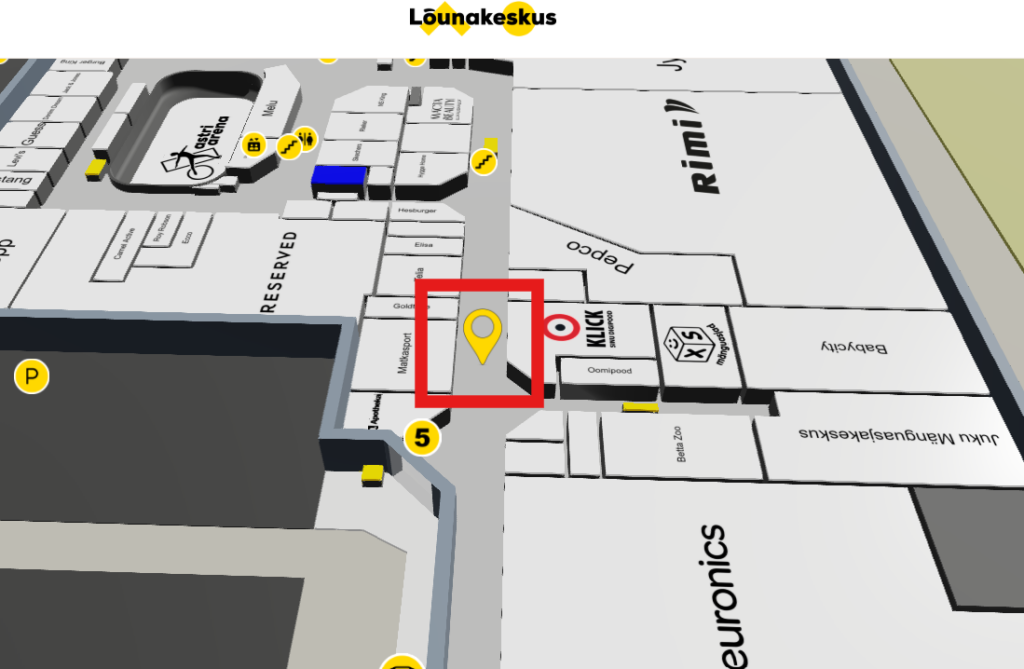
Thus, when a visitor picks a destination, the kiosk draws the route from that point. Similarly, QR codes and NFC tags bring the same idea to the visitor’s phone. In this case, physical QR and NFC elements are installed inside the venue. They work best in places where people need guidance, such as entrances or busy junctions. In practice, scanning the code opens the map in the phone’s browser, with the location already pinned.
The setup is simple. You need a digital map of the building, a touch screen for the kiosk and physical labels for the QR/NFC version. Visitors do not need an app, beacons or extra network hardware. For that reason, shopping centres, museums, exhibition halls and hospitals benefit the most, since many visitors come only once. Above all, the browser approach removes the need to download anything.
On the other hand, the position stays tied to the spot where the screen or code is. Once the visitor starts walking, the map does not follow them. Therefore, people may need to scan another code along the way on longer routes. In short, kiosks and QR codes offer a reliable, low-cost starting point that works on every phone.
Indoor User Positioning with Bluetooth Beacons
The blue dot is the moving marker most people know from outdoor maps. Indoors, it shows the visitor’s live position and updates as they walk. For indoor user positioning, the phone must measure signals from fixed points in the building. In this case, Bluetooth Low Energy (BLE) beacons are the most common choice. These small battery-powered devices sit on walls or ceilings, usually every five to seven metres along hallways. The phone reads their signal strength and calculates its position from it.
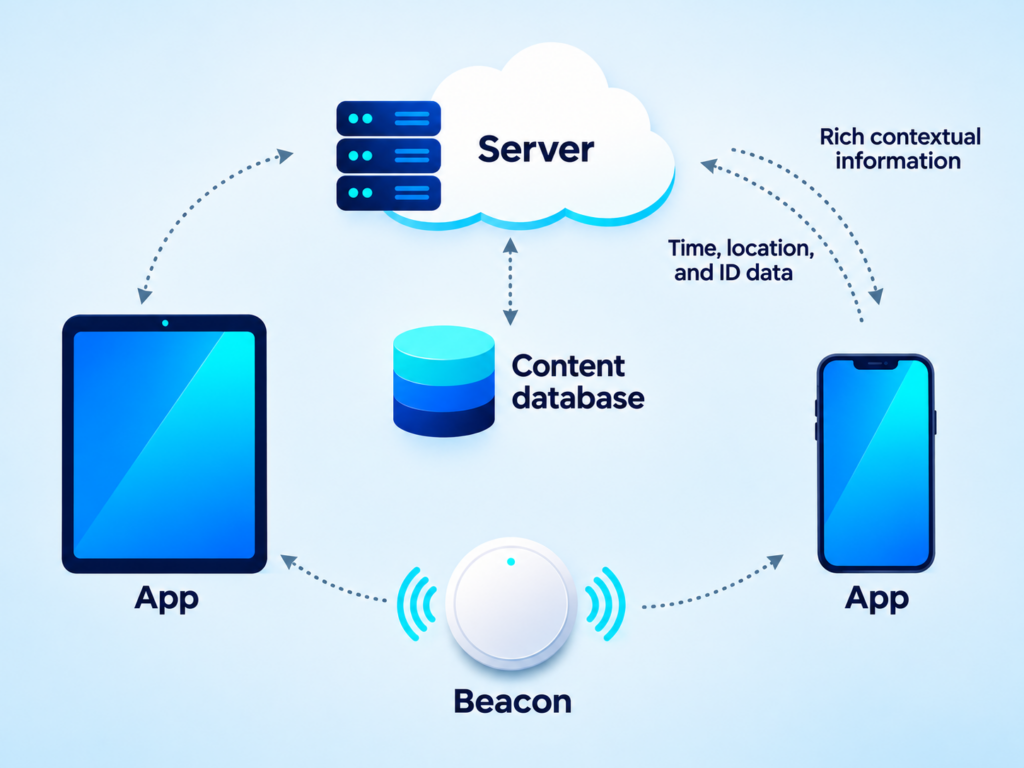
Unlike the kiosk and QR options, the blue dot needs a native mobile app since phone browsers cannot scan Bluetooth signals continuously. In addition, the venue has to buy, install and maintain the beacons, including battery replacement. Alternatively, WiFi access points can also provide positioning, but only on Android phones. Moreover, WiFi positioning is less precise, often within five to fifteen metres.
For these reasons, the blue dot suits places where people return often or use the building every day. Large airports, hospital staff and corporate campuses are good examples. Similarly, staff with company-issued Android phones can use WiFi-based positioning without extra beacons. For one-time visitors, however, the app becomes a barrier, because few people install an app for a single visit. Overall, the blue dot offers the richest experience, but it also requires the largest investment.
Manual Location and Destination Entry
Sometimes the simplest solution works best. With a manual entry panel, the visitor chooses both the starting point and the destination. For instance, someone standing near a café can select that café as their start and any other location as their destination. The map then draws the full route between the two points. This works on kiosks, websites and phone browsers alike.
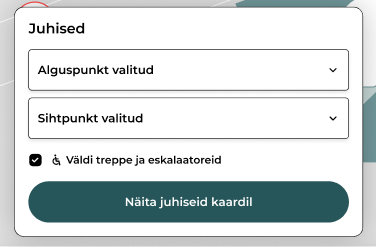
The only prerequisite is a well-built map with clearly named locations, such as shops, rooms, entrances and other facilities. Websites benefit the most, because people can plan a visit from home before they arrive. Likewise, the panel helps visitors who have not scanned a code. In the case of positioning, the main limitation is that the system relies on the visitor to know roughly where they are. If they pick the wrong starting point, the route will be wrong as well. Nevertheless, manual entry adds flexibility at almost no extra cost.
To sum up, no single method works best for every building. Kiosks and QR codes give a reliable starting point on any phone, without apps or extra hardware. The blue dot delivers live indoor user positioning, but it requires an app and a network of beacons. Manual entry, in turn, lets people plan their route anywhere, even from home. For most public venues, a mix of kiosks, QR codes and manual entry covers nearly every visitor. By contrast, the blue dot makes sense where people use the building regularly.